
Why is SEO optimization important? Simply put, no matter how great your product or service is, it will be hard for you to make money with it if no one can find it.
Fortunately, SEO is not rocket science. Of course, it takes time to learn the nuances, but it doesn't take years to learn the basics and optimize your site properly. Follow the instructions in this article and you will achieve good results without hiring SEO agencies or specialists.
SEO (Search Engine Optimization) is a set of activities aimed at increasing the number of visitors to a site from natural search results (Organic search results). This includes things like keyword research and content creation (On-Site SEO or On-Page SEO), backlinking (Off-Site SEO or Off-Page SEO) and technical audits.
Despite the fact that in the context of SEO we usually talk about how to build the content of a site so that it can be found and understood by search engines like Google, Bing, Yahoo, Yandex… SEO is also about the people who use these search engines. It's about understanding what people are searching for online, what words they're using to search, and what kind of content they want to find. By knowing the answers to these questions, you will be able to communicate with them more accurately and, more effectively, and offer your products and / or services.
In the following, we will mainly talk about how to get to the TOP 3 or at least the TOP 10 of the Search Engine Results Pages (SERP). Why only Google?
I think you've heard of Maslow's hierarchy of needs? It's similar to SEO - just as self-expression and love don't matter if you don't have access to basic necessities like food and water, you won't be in the TOP 10 if the search engine can't find or index your site properly.
In this case, the pyramid of needs would be as follows:
*Keywords - Definitions vary, such as the words or word combinations that best describe the content of your page or post. But what you think "best describes the content of your page or post" doesn't matter when it comes to Google search results, because you're not already looking for it - it's done by others with different life experiences and understanding of things. Therefore, I would paraphrase this definition as follows - Keywords are words or groups of words that internet user usesto search the search engine.
That is, if you think your product or service is best described by the word "X," which is probably the case, but most people use the word "Y" when searching for such a product or service, they're less likely to visit your website.
Therefore, if you want to successfully develop your business on the Internet - it all starts with keywords. These must be chosen carefully before you start building your site and its content.
Good domain names are those that:

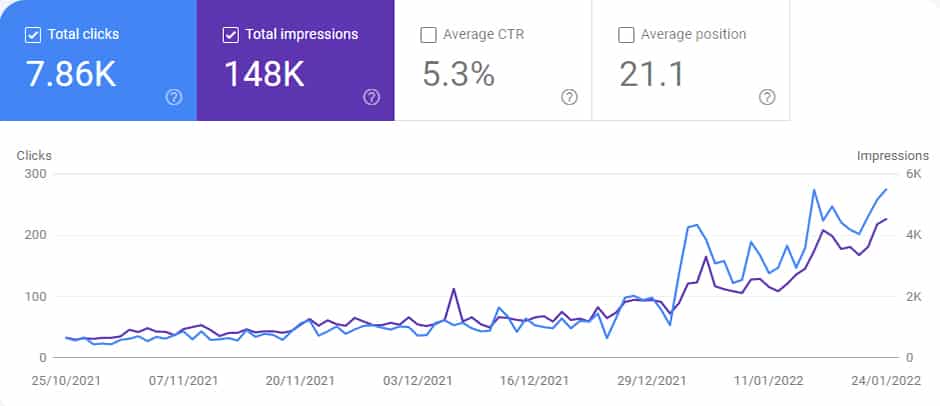
Search engines can start crawling and indexing sites as soon as they're available, but new sites almost never get to the first page of search results, no matter how good the content. This is the so-called Google Sandbox a phenomenon that can last up to 8 months. It is not clear whether the time or number of visitors is removed, but given that content-rich sites and relatively large numbers of visitors are removed more quickly, it is likely that there is a specific number of more visitors that Google considers the site to be. for "worthy" appearing on the first pages of the SERP.
The graph below shows the evolution of the organic traffic for a site that had nearly 200 pages at launch, 16 of which were in-depth articles, and the number was updated weekly. However, within 3 months, the progress was minimal, but reaching a stable number of 300+ 1-day visitors - everything suddenly changed.
Some sources recommend that you run the site as soon as you have purchased a domain with the message "Coming soon" or the traditional WordPress message "Just another WordPress site." However, if the page has little or no content, Google may apply Thin content penalty and it will be even harder for your page to get to the TOP 10 of search results.
The structure of the site and the ease of navigation is one of the most important elements of SEO. Of course, you will think about the structure of your site anyway, but it is important to think about it strategically - keeping in mind how it will affect SEO, ie how simple or difficult it will be for search engines to find and index the content of your site. This applies not only to robots / bots, but also to live visitors to your site.
Search engine ranking algorithms will use the structure of the site to understand how important each particular content is and to rank it. The structure of the site also helps bots to discover / index the pages. Internal links play an important role in indexing individual pages - pages that are not linked from other pages on the same site may remain unindexed for a long time.
Officially, there is no single system or best practice for site structure, but sites with fewer clicks than the home page are better suited for indexing - crawlers can find and access pages more easily. Sites with a complex structure can be indexed less frequently, especially if they are not regularly updated with new content.
Most sites use a "pyramid" structure that starts with the home page, followed by the most important pages on the site. Here are the sub-categories, individual product pages, articles, blog posts, and more.
In most cases, the following hierarchy would be recommended:
Before launching the site, you should define / understand what content will be displayed and where it will be possible to get it from any page of the site with 3 to 5 clicks.
Although the URLs (URL - Uniform Resource Locators are not an SEO ranking signal, but URL structure can play an important role in indexing and how search engines understand a site.
Try to use static URLs (which do not change and are always the same for all users). The URLs themselves can be descriptive to improve your clickthrough rate (CTR / CTR) and make them more attractive to search engine SERPs, but try to avoid duplicate content by using the same words in multiple URLs.
Avoid complicated URLs with random identifiers and parameters - make them words - clear, concise, human-readable.
Bad URL examples: https://www.example.com/index/23878656/abc/resources/products/id-26483h or https://www.example.com /? p = 20133.
A good example of a URL: http://www.web-studio.lv/majas-lapas-izstrade/, because it is immediately clear what this particular page will be about.
Technically, the WordPress URL structure only needs to be set once and can be easily done in the wp-admin panel / Settings / Permanent Links.
Most people know the importance of keywords in SEO. However, keyword-based content development is generally considered to begin after it is published. A better strategy is to focus on keyword research before launching your site because:
Key keywords can appear on top-level pages and the URLs of those pages where they are more likely to rank higher in search results.
Long-tail keywords (keywords made up of multiple words) can be used to create content tailored to more specific content and product pages. These keywords also have a much clearer search intent, and you can also use them to create new content for your blog or to create lower-level pages designed to generate traffic (traffic) for very specific queries.
Read HERE for detailed instructions on researching and evaluating keywords.
This is another obvious part of launching any site - if there is no content no one has any reason to visit or stay on the site.
Remember that "content" means not only text, but also images, video, audio (such as podcasts), interactive graphics, navigation tools - virtually everything on your site that can be seen, read, listened to.
You've done keyword research and can now use it to create content. Keep 2 things in mind:
It is generally recommended that you place your keywords in:
All of this, of course, helps search engines index content, but the truth is that there is no evidence that Google's ranking algorithm uses any kind of keyword density metric. Also, Google often shows its own page descriptions, and some experts recommend that you don't even create them (Meta descriptions), but allow Google to create what they think is more relevant and thus qualify for more keywords. It also often happens that your content is displayed according to keywords you didn't even think of writing.
All of this doesn't mean that keywords don't matter, just use keywords to get the most out of your written or other content, and don't try to artificially inflate them.
Google has developed an SEO guide that describes best practices. Before launching your site, make sure that your site and its content do not violate these Google Terms. It is important! If you violate Google's good practice, there is a high risk that your site will be penalized* (Google manual action).
*Manual action is a penalty imposed by Google for non-compliance with our best practice guidelines. What are the consequences? The visibility of a site in search results is most often reduced. There are two types of manual actions:
In May 2020, Google announced the Core Web Vitals implementation - parameters designed to assess the "health" of the page to ensure a smooth and seamless User Experience (UX).
These metrics consist of three components: Content Load Rate (LCP)Largest Contentful Paint), interactivity (FID - First Input Delay) and visual stability (CLS - Cumulative Layout Shift).
Core Web Vitals is already an essential part of Google's ranking algorithm. Therefore, if you want to get into the SERP TOP 10, you need to know about these parameters and plan how to build your site to the highest possible level.
It should be noted that Google will not improve your site's SERPs because your site is good at Core Web Vitals, but will lower your site's rankings if they are bad.
Core Web Vitals has a very significant effect on page load speed, which in turn depends on:
Considering that Around 53% of site visitors will get to them from natural search results - It's a good idea to think about these issues before you start building your site, as changes to your site's structure and design will be more difficult to implement once you launch it.
You can see good examples of website designs (load in less than 2 seconds) in the section of this website Website samples.
This, though I think is an outdated recommendation, but given that there are still some mobile-unfriendly sites and that at least 60% users' websites are used on mobile devices, let's take a brief look at it.
The main thing to consider when designing a WordPress site is whether the theme you choose is mobile-friendly (responsive design). Topics created in recent years include this functionality, but parents may not. Just make sure it's mobile-friendly before you start using it.
Parameters such as text size and formatting, or the distance between page elements in WordPress can be easily changed at any time, and the importance of page load time is already discussed (for mobile devices, this is even more important because data transfer is slower than on a fixed network).
An important part of SEO is the ability to measure the number of visitors to your site and track their activities while they are on your site. This typically involves creating a Google Analytics account and placing the Google Analytics tracking code on each page of your site and activating the Google Search Console.
Google Analytics lets you track the number of visitors to your site, and the Google Search Console lets you get information about your site's performance directly in organic search results (what keywords appear in the SERP, how often, how many people clicked on them, etc.) and what Last but not least, about technical issues with your site that are very helpful in diagnosing and improving your site's overall performance.
That's all for success!
10 responses
really great info
Thanks for this informative post its really awesome post, helpful infrmation waiting for next articl.
I truly want to express gratitude to you for those great instructions you are writing here.
This writing is commendable. Simple, clear and without unnecessary blah, blah, blah
I really wanted to jot down a small comment in order to thank you for the information you are posting at this site.
Hello! I was checking out your blog for the first time this morning and wanted to drop a note that it was very cool.
Hello! I was checking out your blog for the first time this morning and wanted to drop a note that it was very cool.
I like the valuable information you provide in your articles.
I really enjoyed your article. Congratulations on the content.
This blog was… how do I say it? Relevant!! Finally I have found something that helped me. Thanks!